Not only is it extremely painstaking to create details for each part, but it is also almost impossible to trim the resulting geometry to a circle.
This is where Assembly Detail Round (ADR) comes in.
ADR scans the entire parts structure, creating details for each part as required. When a part is created a circle is drawn inside it and any elements entirely or partially outside the circle are either deleted or trimmed.
The resulting detail is correctly scaled as required. Geometric feedback is given continuously to show you the size of the detail as it will be when processed.
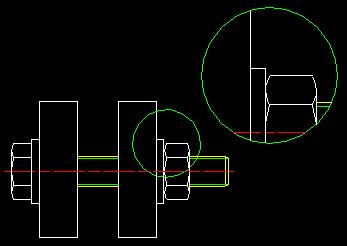
An example of the result of ADR is shown here. Click on the image and you can download the ME10 file or click on the movie icon and see the macro in action!
Assembly Detail Round works on all platforms, but we recommend that ME10 release 10.50 is used. ADR is not dependent on the classical parts browser and is therefore fully compatible with the WUI.