Getting information about analysed elements and dimensions
"Info".
By picking info you can get accuracy related information about elements and dimensions. The type and amount of information depends on the element selected.
|
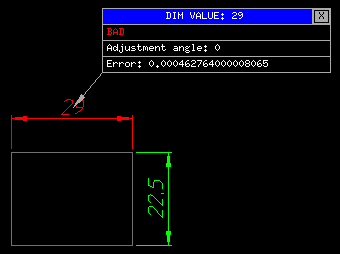
In this case we have picked a "BAD" dimension. The information we are given is the nominal "DIM VALUE": 29(mm). We are told the dimension is "BAD" and that the dimension has an "Adjustment angle" of 0 degrees. The actual "error" is 0.00046276....(mm). |
If you need to use the data in the table, just pick the field you are interested in. For example the error value can be put onto the command line by picking on the "Error:" line. The "Info" function will continue without interruption.
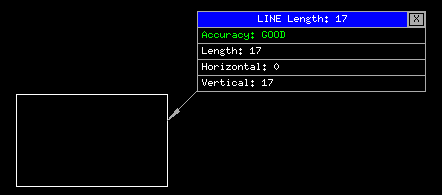 |
In this case we have picked a "GOOD" line. The information we are given is the type of element (LINE) and its length: 17(mm). We are told the line is "GOOD". The other information is the horizontal and vertical components of the line. |
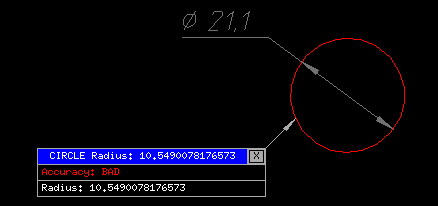 |
In this case we have picked a "BAD" circle. The information we are given is the type of element (CIRCLE) and its radius: 10.549007...(mm). We are told the circle is "BAD". The radius is available if you pick the last line. |
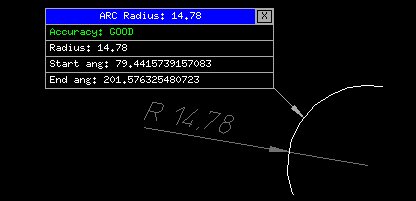 |
In this case we have picked a "GOOD" arc. In addition to the normal data, we are also given the start and end angles. |
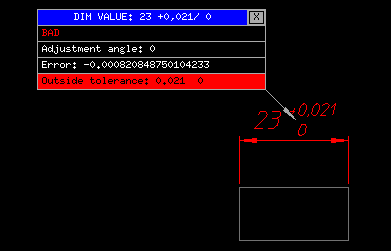 |
When a toleranced dimension is selected then the error value will be compared to the tolerance range. If the error is within the tolerance then a message to that effect will be displayed. In this case the error is outside the tolerance. |
| Prev |