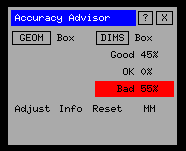
Performing a dimensional accuracy analysis
As with geometrical analysis, there are two options available for conducting a dimensional analysis: "DIMS" (=ALL) and "Box" (=selective).
If "DIMS" is picked the system will immediately begin an analysis of all dimensions. Normally, there are far fewer dimensions on a drawing than geometry so no estimation of time needed is performed. The progress meter should move quickly to completion.
If "Box" is selected you must chose an area (box) containing dimensions you wish to analyse. The program then continues as described above.
|
When the analysis is complete, the table will show the percentage of good, OK and bad dimensions. In the example shown here only 45% are good and 55% bad. |
You may highlight a specific accuracy level by picking a field. For example if you pick "Good 45%" then all the "good" dimensions will be highlighted in their true colours.
| Prev |