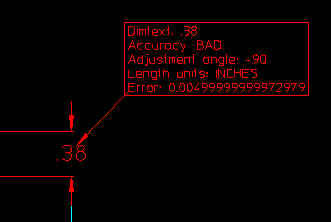
By picking "Info" you can get accuracy related information about elements and dimensions. The type and amount of information depends on the element selected.
From version 4.0 of Accuracy Advisor, the "Dimension error table" is available. The DET is activated by picking the "BAD" dimension field of the main menu. Read more about DET here.
![]() |
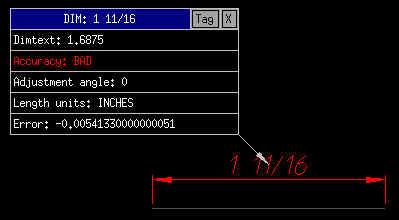
In this case we have picked a
"BAD" dimension. The information we are given is the nominal value 1 11/16
(inches*) . We are told the dimension has a decimal value of 1.6875 and is
"BAD". The dimension has an "Adjustment angle" of 0 degrees. The
actual "error" is -0.0054133....(inches). If you need to use the data in the table, just pick the field you are interested in. For example the error value can be put onto the command line by picking on the "Error:" line. The "Info" function will continue without interruption. *) Does not apply to version 1.x.Versions below 2.0 accept decimal formats only |
![]() |
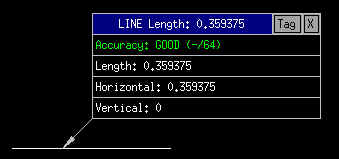
In this case we have picked a "GOOD" line. The information we are given is the type of element (LINE) and its length: 0.359375(inches) is a correct product of one 64th of an inch*. We are told the line is "GOOD". The other information is the horizontal and vertical components of the line. |
![]() |
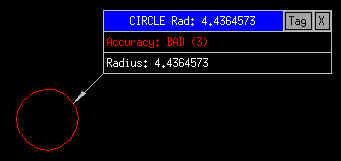
In this case we have picked a "BAD" circle. The information we are given is the type of element (CIRCLE) and its radius: 4.4364573(mm). We are told the circle is "BAD". The accuracy to which the radius is evaluated is given in the number of decimals in parentheses. In this case 3. |
![]() |
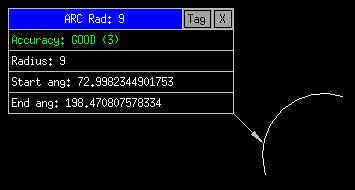
In this case we have picked a
"GOOD" arc. In addition to the normal data, we are also given the start and end
angles. (The angles are not analysed for accuracy.) |
![]() |
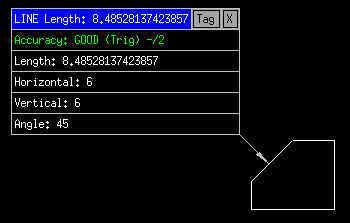
In this case an angled line has been
analysed and in spite of it being of length 8.48528137mm has been classed as GOOD. This is
because the trigonometric values are good (horizontal, vertical and angle). The number of values needed for classification as GOOD can be controlled in the options menu. Does not apply to version 1.x. Only basic lengths are analysed. |
![]() |
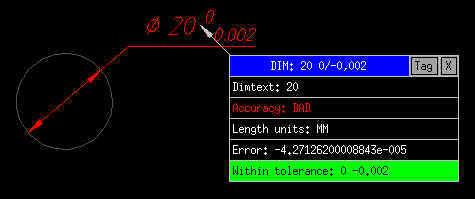
When a toleranced dimension is selected then the error value will be compared to the tolerance range. If the error is within the tolerance then a message to that effect will be displayed. In this case the error is within the tolerance. |
![]() |
If Accuracy Advisor is used in a proper
quality control environment, then it will be necessary to document any inaccuracies. By clicking the "Tag" button in the info table the accuracy information is transferred into a text block attached to the element inquired. The size of the text used is 50% of the present text size. |
![]() |
Another quality control
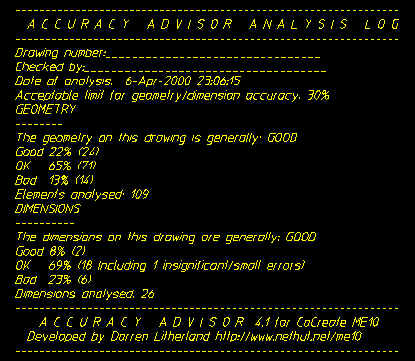
document that may be generated is the "Accuracy Advisor Analysis Log". After running geometric and/or dimensional analyses, press "View log" in the main menu. A text editor will be activated and log data displayed. You may edit this file with the drawing number, your name or any other data you consider appropriate. Save the file with Control-D (Unix) or Save and exit (from Windows). The log can then be placed on the drawing or used as a separate document.
|