| Please note that these pages apply primarily to Accuracy Advisor release 5.0. The freeware version 1.1 does not support all the functions described here. | |
|
For decades, the
"accuracy" of a technical drawing has been judged by the ease of manufacture and
assembly of the component. If the final product was satisfactory then the drawing
describing the component was "accurate". Components have been
manufactured by reading dimensions on drawings by eye. The accuracy depended entirely on
the TEXT printed on the paper. Today we send dxf files and 3D models directly to machining and the text on the drawings has virtually no significance. The accuracy of a drawing depends almost entirely on the actual GEOMETRY of the electronic drawing or model. |
| Where 2D drawings are used in
the manufacture of components the dimensions should, ideally, be "rational" for
example 24.75mm. This way it is much easier to manage the design and production processes.
Designers are able to communicate dimensions verbally. Relationships between components
(e.g. clearances) can be considered without being concerned about the "unseen"
decimals. 2D-drawings sent electronically (2D-dxf,iges) should contain only rational
dimensions as CNC systems work slavishly with an accuracy greater than that our drawing
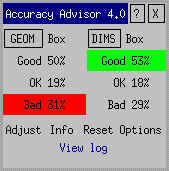
standards anticipated. CAD systems allow dimensioning to a specified number of decimal places, 2 is quite common. If a vector with a length 24.7513244423mm is dimensioned it will show 24.75(mm). The system will probably not inform the user that the geometry is in fact 0.0013244423mm longer! CAD systems help the user to work accurately, but if an error does occur then it will tend to spread into other areas like a virus. Many hours of detective work must be spent if the original error is to be found. If the error is critical and the cause cannot be found then it must be compensated for elsewhere. The Accuracy Advisor can help in finding geometrical and dimensional errors (anomalies). If a dimension is incorrect and the geometry does not correspond exactly the user may adjust the geometry. The Accuracy Advisor allows easy access to geometric data (length, radius etc,) and highlights the grades of accuracy found in the drawing. |
|